
Send email from a different email address
In the compose window, select
 > Show From to see the From line.
-
Select From and choose which email address you want to use.
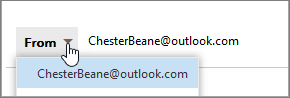
If you don't see all your accounts or aliases, select Other email address... and start typing the email address or name you want to send from.
Notes:
You may not have permission to send from all the addresses you see in the list.
Any sent emails will appear in your Sent Items folder regardless of the address sent from.
-
If your sent emails are not appearing in the Sent Items folder, try these troubleshooting steps:
Sync your email folders by clicking Send/Receive
Check your Outbox to see if emails are stuck there
Verify email delivery through your email security system
Run email diagnostic tools like scanpst.exe
Send a test message from the affected account to another address, and another test message back to the affected account. If neither test message is delivered to the recipient's inbox, this confirms a send/receive delivery problem with that Outlook account.
Comments
0 comments
Please sign in to leave a comment.