-
In the compose window, select
 > Show From to see the From line.
 -
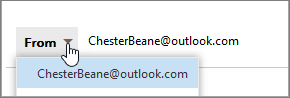
Select From and choose which email address you want to use.
-
If you don't see all your accounts or aliases, select Other email address... and start typing the email address or name you want to send from.
-
To send emails from a shared mailbox: Contact your IT support team to request 'Send As' and 'Read Manage' permissions in the Exchange Admin Center (EAC). After permissions are granted, you may need to restart Outlook for the shared mailbox to appear in your From options.
Send email from a different email address

Comments
0 comments
Please sign in to leave a comment.